What is a computer cluster?
What is a computer cluster?
A computer cluster is a set of loosely or tightly connected computers that work together so that, in many respects, they can be viewed as a single system.
Parts of a computing cluster
To provide high performance computation capabilities, clusters can combine hundreds to thousands of computers, called nodes, which are all inter-connected with a high-performance communication network. Most nodes are designed for high-performance computations, but clusters can also use specialized nodes to offer parallel file systems, databases, login nodes and even the cluster scheduling functionality as pictured in the image below.
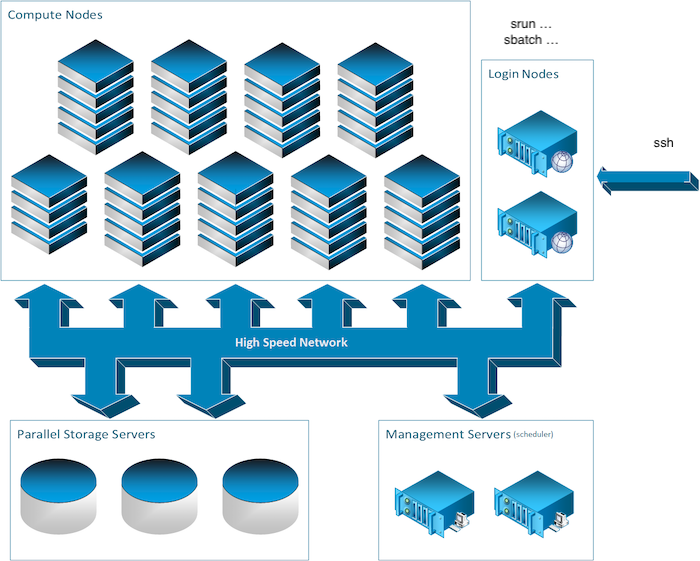
We will overview the different types of nodes which you can encounter on a typical cluster.
The login nodes
To execute computing processes on a cluster, you must first connect to a cluster and this is accomplished through a login node. These so-called login nodes are the entry point to most clusters.
Another entry point to some clusters such as the Mila cluster is the JupyterHub web interface, but we'll read about that later. For now let's return to the subject of this section: Login nodes. To connect to these, you would typically use a remote shell connection. The most usual tool to do so is SSH. You'll hear and read a lot about this tool. Imagine it as a very long (and somewhat magical) extension cord which connects the computer you are using now, such as your laptop, to a remote computer's terminal shell. You might already know what a terminal shell is if you ever used the command line.
The compute nodes
In the field of artificial intelligence, you will usually be on the hunt for GPUs. In most clusters, the compute nodes are the ones with GPU capacity.
While there is a general paradigm to tend towards a homogeneous configuration for nodes, this is not always possible in the field of artificial intelligence as the hardware evolve rapidly as is being complemented by new hardware and so on. Hence, you will often read about computational node classes. Some of which might have different GPU models or even no GPU at all. For the Mila cluster you will find this information in the Node profile description section. For now, you should note that is important to keep in mind that you should be aware of which nodes your code is running on. More on that later.
The storage nodes
Some computers on a cluster function to only store and serve files. While the name of these computers might matter to some, as a user, you'll only be concerned about the path to the data. More on that in the Processing data section.
Different nodes for different uses
It is important to note here the difference in intended uses between the compute nodes and the login nodes. While the compute nodes are meant for heavy computation, the login nodes are not.
The login nodes however are used by everyone who uses the cluster and care must be taken not to overburden these nodes. Consequently, only very short and light processes should be run on these otherwise the cluster may become inaccessible. In other words, please refrain from executing long or compute intensive processes on login nodes because it affects all other users. In some cases, you will also find that doing so might get you into trouble.