What is a computer cluster?
A computer cluster is a set of loosely or tightly connected computers that work together so that, in many respects, they can be viewed as a single system.
Parts of a computing cluster
To provide high performance computation capabilities, clusters can combine hundreds to thousands of computers, called nodes, which are all inter-connected with a high-performance communication network. Most nodes are designed for high-performance computations, but clusters can also use specialized nodes to offer parallel file systems, databases, login nodes and even the cluster scheduling functionality as pictured in the image below.
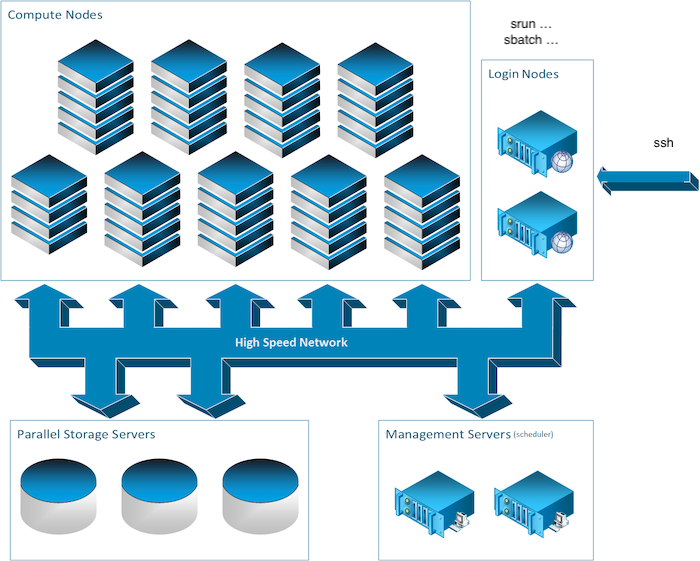
The following sections describe the types of nodes found on a typical cluster.
The login nodes
A login node is the entry point to most clusters. Connect to a login node first, then use it to prepare work and submit it to the compute nodes.
Connections to login nodes typically use a remote shell, most commonly SSH. Some clusters, such as the Mila cluster, also provide a JupyterHub web interface. To connect to the Mila cluster, see Logging in to the cluster.
The compute nodes
Artificial intelligence workloads typically require GPUs. In most clusters, the compute nodes are the ones with GPU capacity.
While there is a general paradigm to tend towards a homogeneous configuration for nodes, this is not always possible in the field of artificial intelligence as hardware evolves rapidly and new hardware is continually added. As a result, compute nodes are often grouped into classes, some of which have different GPU models or no GPU at all. For the Mila cluster, this information is available in the Mila compute nodes section. Keep track of which compute nodes the code runs on.
The storage nodes
Some nodes on a cluster only store and serve files. Users interact only with the path to the data, not with the storage nodes themselves. See the Processing data section for details.
Different nodes for different uses
Compute nodes and login nodes have different intended uses. Compute nodes are meant for heavy computation; login nodes are not.
Login nodes are shared by all cluster users, so take care not to overburden them. Run only short, light processes on login nodes; otherwise, the cluster may become inaccessible. Do not run long or compute-intensive processes on login nodes, as this affects all other users. Doing so may also result in administrative action.