Digital Research Alliance of Canada Clusters
In addition of the Mila cluster, researchers can have access to clusters provided by the Digital Research Alliance of Canada organisation (DRAC, or the Alliance). These clusters are to be used for larger experiments having many jobs, multi-node computation and/or multi-GPU jobs.
DRAC also collaborates with the CIFAR AI Chairs to provide clusters dedicated to AI research, called the Pan-Canadian AI Compute Environment (PAICE) clusters. See PAICE Clusters for more information.
Clusters of the Alliance are shared with researchers across the country,
in part through a system of allocations. Allocations are given by the
Alliance to selected research groups to ensure a steady availability of
computational resources throughout the year. From the Alliance's documentation:
An allocation is an amount of resources that a research group can target for
use for a period of time, usually a year.
Every university professor in Canada gets a default allocation, and they can add their collaborators to it. Depending on your supervisor's affiliations, you will have access to different allocations. Almost all students at Mila supervised by "core" professors should have access to the Mila global allocation described below, but it is not the only one. Your supervisor is your first point of contact in knowing which allocations you should have access to.
Note
An allocation is not a maximal amount of resources that can be used simultaneously, it is a weighting factor of the workload manager to balance jobs. For instance, even though we are allocated 408 GPU-years across all clusters, we can use more or less than 408 GPUs simultaneously depending on the history of usage from our group and other groups using the cluster at a given period of time. Please see the Alliance's documentation for more information on how allocations and resource scheduling are configured for these installations.
Note
If you use DRAC resources for your research, please remember to acknowledge their use in your papers.
Account creation
To access the Alliance clusters you have to first create an account on the CCDB Portal at https://ccdb.alliancecan.ca. We recommend using your @mila.quebec email.
Then, you have to apply for a role at
https://ccdb.alliancecan.ca/me/add_role, which basically means telling the
Alliance that you are part of the lab so they know which cluster you can have
access to, and track your usage.
You will be asked for the CCRI (Compute Canada Role Identifier) of your sponsor. Please reach out to your sponsor for more infos.
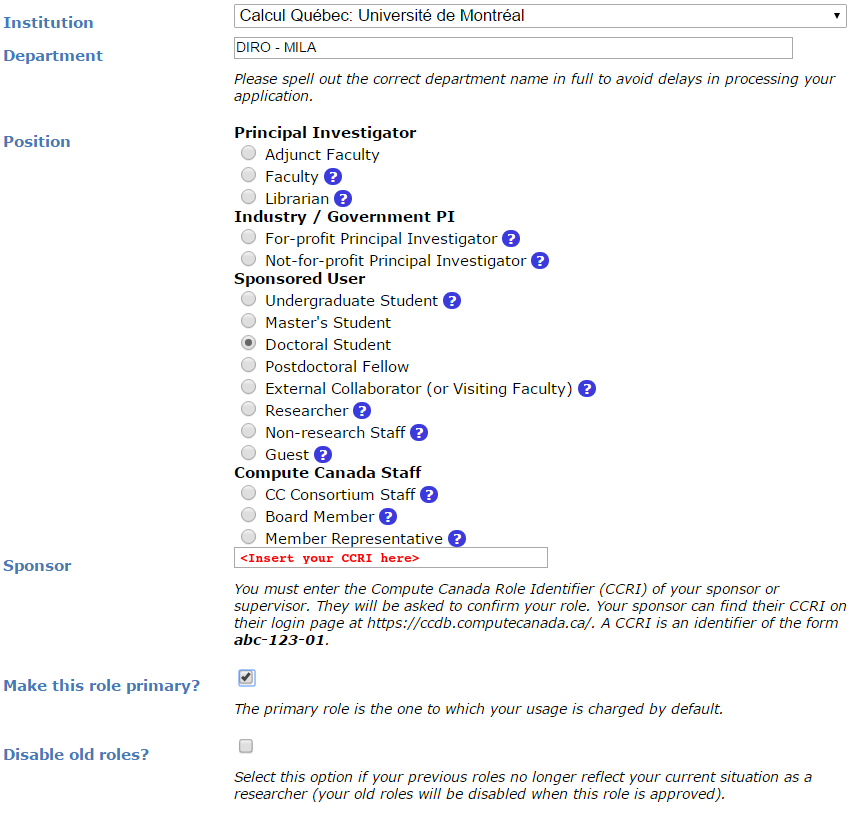
As a Mila researcher, you can request access of all the resources in the HPC tabs in Resources > Access Systems at CCDB.
You will need to wait for your sponsor to accept your request before being
able to login to the Alliance clusters. The default accounts are of the form
def-<yourprofname>-gpu and def-<yourprofname>-cpu. Management of a
professor's default DRAC allocation is their personal responsibility and is
beyond the control of Mila. We are unable to provide support for such
management.
Access to Mila global allocation
If your supervisor is a Mila "core" professor, you are elligiable to the Mila
global allocation rrg-bengioy-ad. To be added to the allocation, write to
ccdb-accounts@mila.quebec and share your CCRI.
Connect to the clusters
To login to the DRAC clusters, you need to set up your SSH keys on the CCDB
portal. You can generate an SSH key pair using ssh-keygen and then add the
public key to your account on the CCDB portal at My Account > SSH Keys.
You can use milatools, with the command mila init, to help create your SSH
config or validate your installation.
You also need to set a multifactor authentication on the CCDB portal at My Account > Multifactor Authentication. More infos available on the DRAC documentation.
Renewal
All user accounts (Sponsor & Sponsored) have to be renewed annually in order to keep up-to-date information on active accounts and to deactivate unused accounts.
To find out how to renew your account or for any other question regarding DRAC's accounts renewal, please head over to their FAQ.
If the FAQ is of no help, you can contact DRAC renewal support team at
renewals@tech.alliancecan.ca or the general support team at
support@tech.alliancecan.ca.
Clusters
The table below provides information on the Mila global allocation with the account
rrg-bengioy-ad for the period which spans from April 7, 2026 to Spring 2027.
| Cluster | CPUs | RGUs allocated | # GPU equiv | Model | Unrestricted internet |
|---|---|---|---|---|---|
| Fir | 0 | 2090 | 171 | H100-80G | Yes |
| Nibi | 0 | 363 | 30 | H100-80G | Yes |
| Rorqual | 263 | 1172 | 96 | H100-80G | No |
| Trillium | 768 | 375 | 31 | H100-80G | No |
Check the current status of the clusters on the DRAC status page.
Note
DRAC uses a concept called RGUs (Reference GPU Units) to measure the
allocated GPU resources based on the type of device. This measurement
combines the FP32 and FP16 performance of the GPU as well as the memory
size. For example, an NVIDIA A100-40G counts has 4.0 RGUs, while a while an
H100-80G counts as 12.15 RGUs.
This is an improvement over the previous system of counting physical GPU devices and disregarding their actual performance. Saying that "we have 4 GPUs per researcher" omits which kind of GPUs we're talking about, which is fundamentally important.
Fir
Digital Research Alliance of Canada doc
The successor to the legacy Cedar cluster. Retains its filesystem.
Nibi
Digital Research Alliance of Canada doc
The successor to the legacy Graham cluster. Retains its filesystem.
Rorqual
Digital Research Alliance of Canada doc
The successor to the legacy Beluga cluster. No internet access on compute nodes.
Trillium
Digital Research Alliance of Canada doc
The successor to the legacy Niagara cluster. It is principally but not exclusively a CPU cluster. No internet access on compute nodes.
Trillium is not run exactly like other clusters. Most notably:
- Trillium is structured as two sub-clusters, once CPU and one GPU.
- Trillium (CPU):
- Login node
trillium.alliancecan.ca - Jobs are allocated on a per-node basis, not per-CPU.
- Login node
- Trillium-GPU:
- Login node
trillium‑gpu.alliancecan.ca - Jobs allocated either per-node, or single-GPU (1/4 node).
- Login node
- Trillium (CPU):
- Both share their filesystem.
- Job submissions must be made from
$SCRATCH.
Refer to the Trillium Quickstart Guide for more details before using this cluster.
Other clusters
Theses clusters are not part of the Mila global allocation, but you might have access to them depending on your supervisor's affiliations. Please check with your supervisor.
Narval
Digital Research Alliance of Canada doc
Narval is the oldest cluster still online, and contains the oldest and smallest GPUs (A100-40GB). For some students, this cluster might be a good choice if they have already set up there or if the A100 is enough for their experiments (e.g. jobs that cannot utilize a full H100). No internet access on compute nodes.
Launching jobs
Users must specify the resource allocation Group Name using the flag
--account=rrg-bengioy-ad. To launch a CPU-only job:
Note
The account name will differ based on your affiliation.
To launch a GPU job:
And to get an interactive session, use the salloc command:
The full documentation for jobs launching on Alliance clusters can be found here.
Storage
| Storage | Path | Usage |
|---|---|---|
$HOME |
/home/<user>/ |
Code, specific libraries |
$HOME/projects |
/project/rrg-bengioy-ad |
Compressed raw datasets |
$SCRATCH |
/scratch/<user> |
Processed datasets, experimental results, logs of experiments |
$SLURM_TMPDIR |
(on compute node) | Temporary job results |
They are roughly listed in order of increasing performance and optimized for different uses:
- The
$HOMEfolder on Lustre is appropriate for code and libraries, which are small and read once. Do not write experiemental results here! - The
$HOME/projectsfolder should only contain compressed raw datasets (processed datasets should go in$SCRATCH). We have a limit on the size and number of file in$HOME/projects, so do not put anything else there. If you add a new dataset there (make sure it is readable by every member of the group usingchgrp -R rpp-bengioy <dataset>). - The
$SCRATCHspace can be used for short term storage. It has good performance and large quotas, but is purged regularly (every file that has not been used in the last 3 months gets deleted, but you receive an email before this happens). $SLURM_TMPDIRpoints to the local disk of the node on which a job is running. It should be used to copy the data on the node at the beginning of the job and write intermediate checkpoints. This folder is cleared after each job, so results there must be copied to$SCRATCHat the end of a job.
When a series of experiments is finished, results should be transferred back to Mila servers.
More details on storage can be found here.
Modules
Much software, such as Python or MATLAB, is already compiled and available on
DRAC clusters through the module command and its subcommands. Their full
documentation can be found here.
| Command | Description |
|---|---|
module avail |
Displays all the available modules |
module load <module> |
Loads \<module> |
module spider <module> |
Shows specific details about \<module> |
In particular, if you with to use Python 3.12 you can simply do:
Python on the cluster
If you wish to use Python on the cluster, we strongly encourage you to read Alliance Python Documentation, and in particular the Pytorch and/or Tensorflow pages.
The cluster has many Python packages (or wheels), such already compiled for
the cluster. See here for the
details. In particular, you can browse the packages by doing:
Such wheels can be installed using pip. Moreover, the most efficient way to use modules on the cluster is to build your environnement inside your job. See the script example below.
Script example
Here is a sbatch script that follows good practices on Narval and can serve
as inspiration for more complicated scripts:
Using CometML and Wandb
Some compute nodes don't have access to the internet, but there is a special module that can be loaded in order to allow training scripts to access some specific servers, which includes the necessary servers for using CometML and Wandb ("Weights and Biases").
More documentation about this can be found here.
Note
Be careful when using Wandb with httpproxy. It does not support sending
artifacts and wandb's logger will hang in the background when your training
is completed, wasting resources until the job times out. It is recommended
to use the offline mode with wandb instead to avoid such waste.
FAQ
What to do with ImportError: /lib64/libm.so.6: version GLIBC_2.23 not found?
The structure of the file system is different than a classical Linux, so your code has trouble finding libraries. See how to install binary packages.
Disk quota exceeded error on /project file systems
You have files in /project with the wrong permissions. See how to change
permissions.
This last question might be obsolete